Troubleshooting
What to check when the plugin, the editor or a USB stick misbehaves.
The plugin does not appear on the install screen
Section titled “The plugin does not appear on the install screen”Make sure the plugin IPL file is in the root of the USB stick, and that the USB stick is inserted into the controller (not the teach pendant).
Make sure the Tablet TP is enabled and hit Retry to refresh the list of available plugins.
The plugin doesn’t appear after install
Section titled “The plugin doesn’t appear after install”Check the software version via Menu > Expand All > Status > Version ID. HMI Forge requires at least FANUC software v9.40P/65, and though FANUC’s plugin system has a way of enforcing this, the resulting error message on a failed install is easy to miss.
Did you remember to cycle power after the plugin was installed?
The editor or runtime is blank
Section titled “The editor or runtime is blank”It’s possible that you tried to load a document created in a later version than what you are running. Please update to the latest version.
Saving fails with an amber chip and a Retry toast
Section titled “Saving fails with an amber chip and a Retry toast”The document stays unsaved and keeps its unsaved marker — nothing has been lost. Read the message on the toast, which says why the save failed.
If it mentions the editor being locked, the lock is set — possibly from another device, since the lock covers every device, or on its own after a controller restart. Unlock, then retry.
Otherwise the controller could not be reached. Check that the pendant or PC still has a connection to the controller, then retry.
Values update, but noticeably slower than usual
Section titled “Values update, but noticeably slower than usual”The runtime normally receives signal changes pushed by FANUC’s plugin API. When that API is down, screens switch to polling so they stay live — values still update, just with up to a second of lag. Updates return to full speed on their own the moment FANUC’s API recovers; if it never does, a controller power cycle restores it.
A control is missing and there’s a banner about controls that couldn’t be drawn
Section titled “A control is missing and there’s a banner about controls that couldn’t be drawn”The HMI document may have been created with a newer version of HMI Forge. Please update to the latest version.
A robot program calls a prompt and nothing appears
Section titled “A robot program calls a prompt and nothing appears”The runtime must be showing on the pendant for a prompt to appear; the call
opens it if it is not, which takes a few seconds. If the alarm HMI prompt … is waiting is posted, open the HMI Forge runtime by hand. HMI prompt … not found or HMI document … not found means a name in the CALL does not match
one in the editor — check the spelling against the tab bar. See
Prompts.
Backup, restore or image import fails with a USB stick error
Section titled “Backup, restore or image import fails with a USB stick error”no USB stick detected means the controller cannot see a stick in the UD1: port at all. Remove and reinsert it, or try a different stick.
USB stick not ready - is it formatted FAT32? means the stick is there but the controller cannot mount it. exFAT and NTFS both fail this way. Reformat the stick as FAT32 — see Installation for the 32 GB limit on Windows.
Tapping a button near the screen’s edge opens a Samsung menu
Section titled “Tapping a button near the screen’s edge opens a Samsung menu”On FANUC’s tablet pendant, tapping a control at the right edge of the screen with the S Pen, such as the X that closes the properties panel, sometimes opens a wheel of Samsung shortcuts instead: Create note, Smart select, Screen write, and so on.
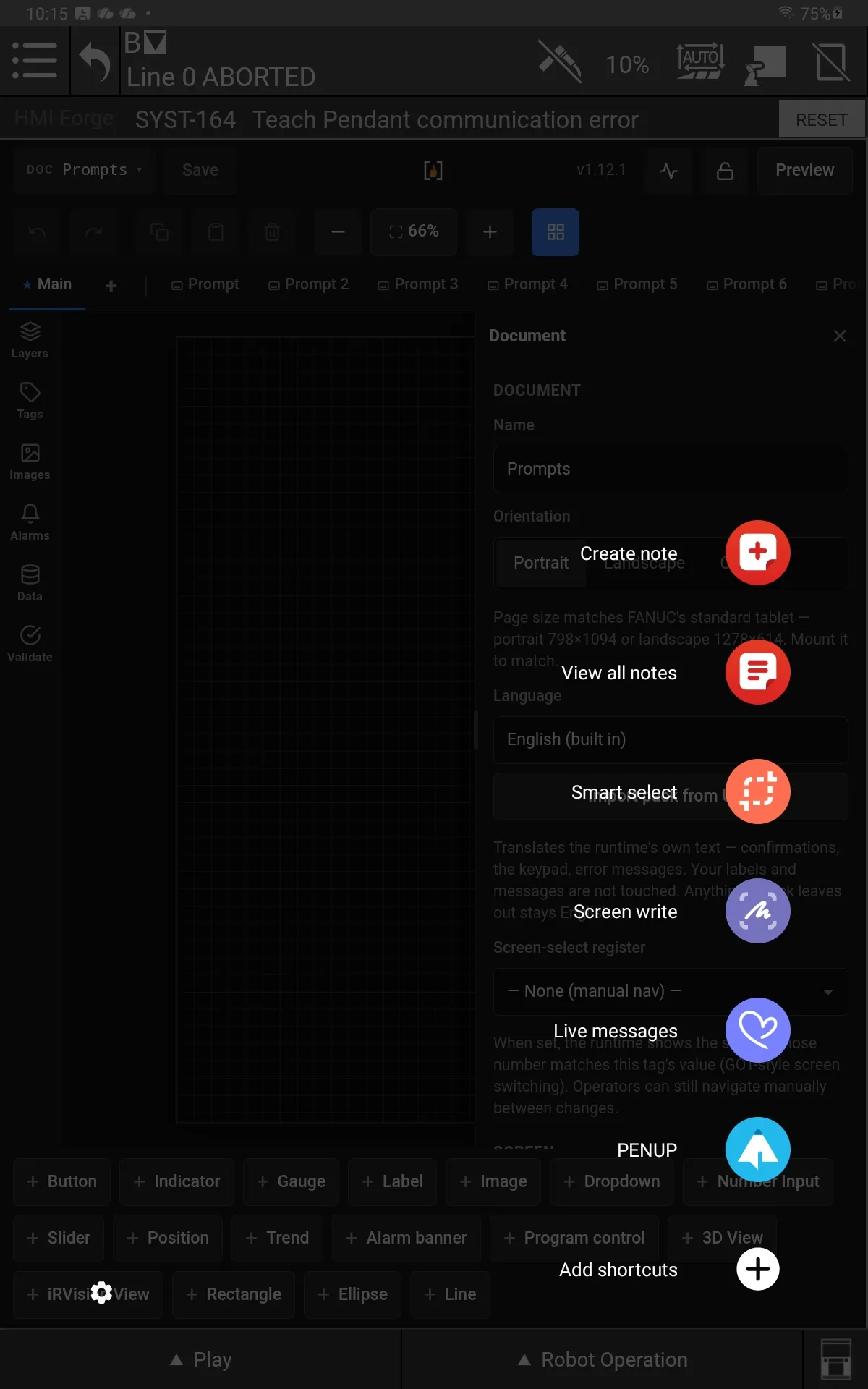
Samsung's Air command menu, opened by the pen instead of the button underneath.
The wheel is Samsung’s Air command for the S Pen. Its floating icon sits at the screen’s edge and opens when the pen touches it, and the pen’s side button opens it too. Turn both off on the tablet:
- Open the tablet’s Settings and choose Advanced features.
- Choose S Pen.
- Under Air command, switch off Show floating icon and Open Air command with Pen button.
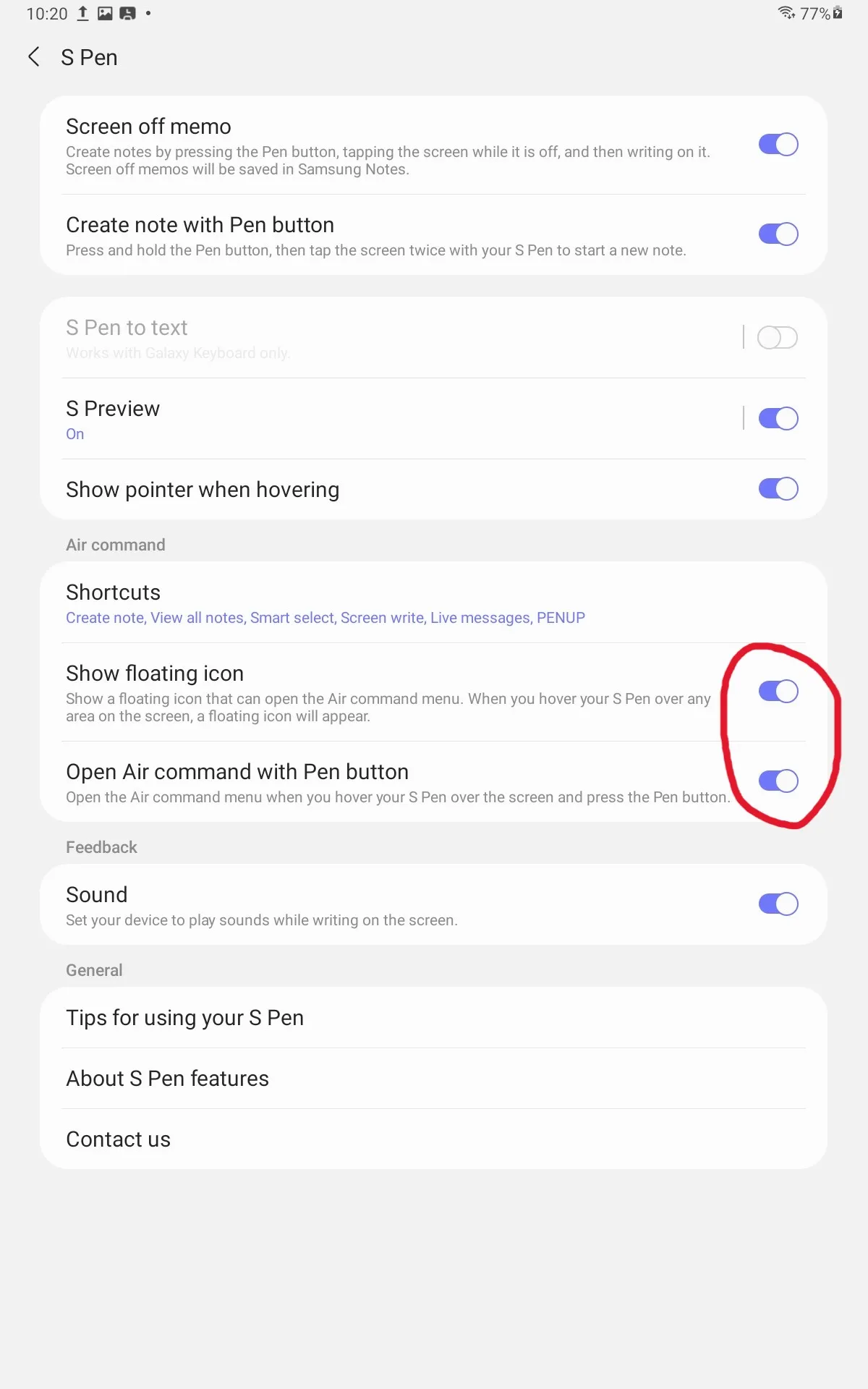
The two switches to turn off.
The pen then taps the button like a finger does.