Dropdown
Choose from a list of values, including the controller's TP programs.
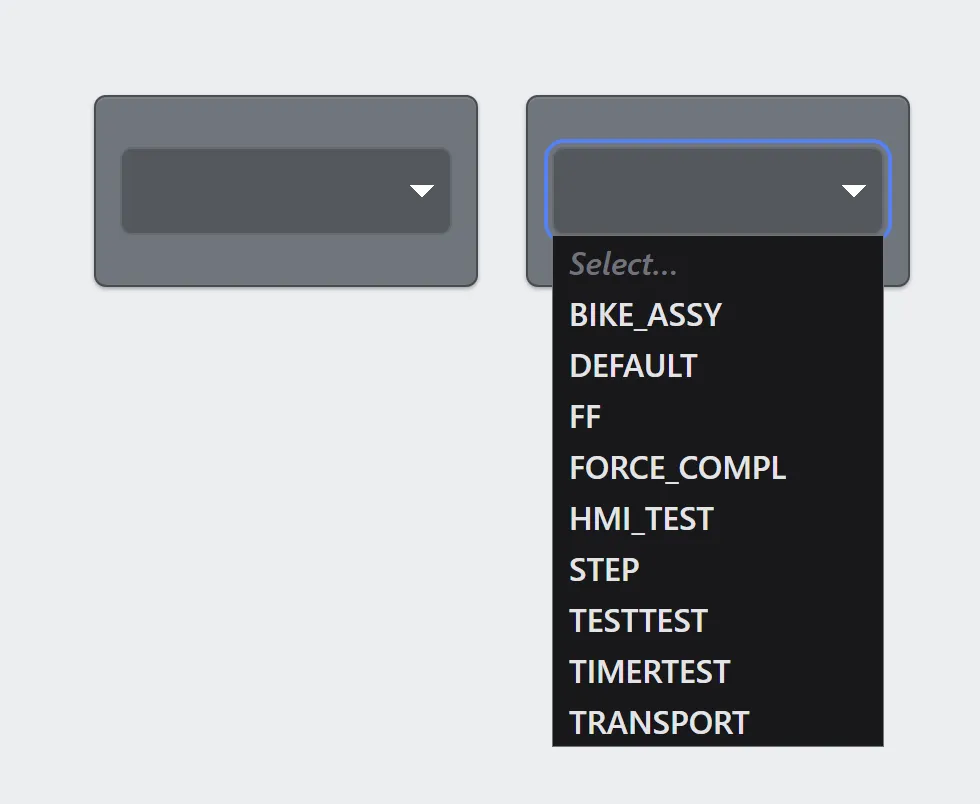
Closed, and open on a controller's TP programs. The placeholder heads the list until something is chosen.
A dropdown writes the selected option’s value to a tag. Options are either a fixed list you type, or the TP programs actually present on the controller. The program list is not saved in the document: it is read from the controller each time the HMI loads, so programs added or deleted later show up on the next load.
Bound to active_program, it lets an operator choose which program the
controller has selected without leaving the HMI for the pendant menus.
Adding the control
Section titled “Adding the control”- Open the document and select the screen you want from the screen tabs.
- In the control palette, press Dropdown and drag it onto the canvas.
- Bind it to a tag, then either add options or switch the source to the controller’s programs.
Like every control an operator aims at, it cannot be smaller than 96 × 48 px.
Properties
Section titled “Properties”| Property | Description | Default |
|---|---|---|
| Label | Text shown above the control. | none |
| Tag | Where the selected value is written. | none |
| Options source | A static list, or the controller’s TP programs. | static |
| Options | Label and value for each choice, when the source is static. | none |
| Program filter | Restrict the program list to names matching a pattern. | none |
| Placeholder | Shown when nothing is selected. | Select… |
| Size | Text size in pixels. | 16 |
| Fill / Text color | Appearance. | theme tokens |
| On select | Actions that run after the operator picks an item. | none |
The label an option shows and the value it writes are separate, so a
list can read Station 1, Station 2 while writing 1, 2.
Changing the selected program
Section titled “Changing the selected program”Bind a dropdown to active_program — under System values in the tag
picker — and choosing an option changes what the
controller has selected.
If a program is running or paused when the operator picks another, they are asked first, and it is aborted before the change — never after. Selecting the program that is already up does nothing rather than interrupting it.
Running actions on a selection
Section titled “Running actions on a selection”On select holds the same action list a button does, so picking an item can do more than write a tag — reset a counter when the part changes, navigate to the screen for the recipe just chosen, call an HTTP endpoint.
They run only when an operator picks something. A dropdown also reflects its tag changing underneath it — a TP program writing the recipe number, say — and actions do not run for that.
They run after the tag is written, so an action reading that tag sees the new selection. On a dropdown bound to the program list, they run only if the change actually took: a program change the operator cancels runs nothing.
On a prompt, a dropdown bound to a Local tag is
how an operator picks from a list; a Done button answers with {tag}.
Related
Section titled “Related”- Program control — Start, Hold, Reset and Abort for the program a dropdown selects.
- Tags — naming the tag a selection is written to.
- System values —
active_programand friends.