Program control
Start, Hold, Reset and Abort as one control that reads machine state.
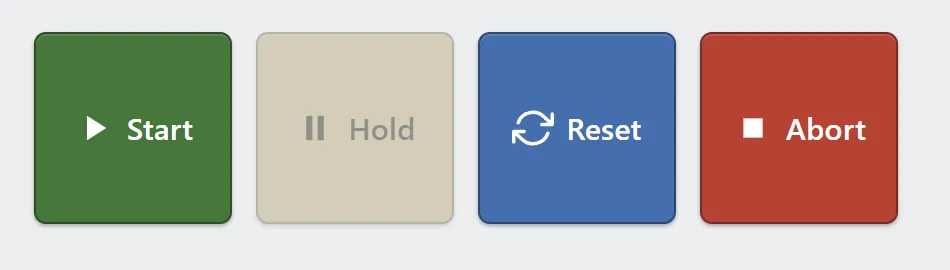
The four commands. Hold is unavailable here because no program is running.
Most operator screens need the same four commands. Rather than wiring four separate buttons to four separate tags, drop one Program control: it arrives connected to the controller’s execution state, with no tags to declare.
Each button lights from the machine rather than from the press. Start lights while a program is running, Hold while it is paused.
Two of them also disable themselves from that state: Start while a program is already running, and Hold while none is. Reset and Abort stay available.
Adding the control
Section titled “Adding the control”- Open the document and select the screen you want from the screen tabs.
- In the control palette, press Program and drag it onto the canvas.
- Choose which of the four commands appear. All four are on by default.
The size floor grows with the number of commands shown: each one needs 96 px of width, plus the gap between them, and 48 px of height.
Properties
Section titled “Properties”| Property | Description | Default |
|---|---|---|
| Program | Which program Start acts on. An expression, so it can follow the controller’s selection. | {active_program} |
| Start disabled when | Expression that, when true, grays Start out on top of the running check. | never |
| Show Start / Hold / Reset / Abort | Which commands appear. | all on |
| Labels | The text on each button. | Start, Hold, Reset, Abort |
| Variants | Theme color for each button. | success, warning, info, error |
| Use icons | Show a glyph alongside each label. | on |
| Orientation | Lay the buttons out in a row or a column. | horizontal |
| Gap | Space between buttons, in pixels. | 12 |
| Confirm abort | Ask before aborting. | on |
| Abort message | The confirmation text. | Stop the running program? |
Which program Start runs
Section titled “Which program Start runs”Program defaults to the expression {active_program}, meaning Start runs
whatever the controller currently has selected. The operator picks a program
elsewhere — a Dropdown, or the pendant — and Start acts on it.
Type a fixed program name instead to pin the control to one program.
Pressing Start on a program that is merely paused resumes it, without a prompt.
Only starting approved programs
Section titled “Only starting approved programs”Start already disables itself while a program runs. Start disabled when adds a rule of your own on top. To keep a cell from starting anything but its two production programs, whatever is selected on the pendant:
{active_program} != "MAIN" && {active_program} != "RECOVER"Start grays out until the operator selects one of those, from a Dropdown or the pendant. The other three commands are not affected. An expression that fails to compile disables nothing, so check it in the Inspector.
A document using this needs runtime 1.12.3 or newer. An older runtime shows its update banner rather than a Start button with the rule quietly missing.
Related
Section titled “Related”- Dropdown — let an operator choose which program is selected.
- System values —
active_programand the other values the controller publishes without a tag. - Button — for a single command, or one the Program control does not cover.