For FANUC integrators and end users
Eliminate the PLC and panel HMI from your robot cell.
In many cells, your FANUC controller can already run it. HMI Forge gives it the operator screen: custom screens built and run on the FANUC Tablet Teach Pendant (TP), with no code.
Creating an HMI with HMI Forge on the FANUC Tablet TP
The case for a custom HMI
Your operators shouldn't have to know their way around all the FANUC menus.
That's asking for trouble: an operator changes a value they shouldn't, or you get a call at 2am because nobody can find the reset button.
The answer is a custom HMI with everything an operator needs and nothing they don't.
You could build one with FANUC's Plugin SDK. That means learning KAREL, HTML, CSS and JavaScript, then days or weeks of work, or paying someone thousands to do it.
With HMI Forge, you install one plugin and build screens on the tablet, with no code. Each one takes minutes instead of hours.
A three-minute narrated video of a nine-minute build: two operator screens, and a prompt the robot program uses to ask the operator a question.
How it works
Design, bind and deploy without leaving the robot.
Design on the tablet
Drag, drop and resize with your finger. Multi-select, align, layers, groups and undo all work by touch. The editor flags mistakes before you save them, like a tag that doesn't exist, a program that isn't on the controller, or a button too small to press. Prefer a mouse and keyboard? Open the editor from a laptop through iRProgrammer.
Bind to live robot I/O
Give each signal a readable name once, whether it's I/O, a register, a position or a system variable. Every control refers to it by that name, so when the cell is rewired you change one tag, not every control that used it. A tag list already in a spreadsheet imports from CSV.
part_presentRI[1]
Labels show live values, and a condition like {speed} > 80 can change a
color, light a lamp or hide a control.
Deploy on the controller
Press Save and the screen runs on the tablet. Move screens, themes and images to another cell or to ROBOGUIDE on a USB stick.
What you see in the editor is what the operator gets.
There's no compile or export step, so the screen can't look different on the floor. The preview runs the same screen, and you can set tag values by hand to test it with no robot attached.
Controls
Controls for the jobs an operator screen does.
Every control is drag-and-drop, binds to live robot I/O by name, and follows your theme. What they add up to:
Run the cell
A ready-made Start / Hold / Reset / Abort row, buttons that write tags or launch TP programs, and dropdowns filled from the programs on the controller. One button can write a timestamped controller backup to a USB stick.
Watch the state
Indicator lamps, gauges with color bands, rolling trends, live position, images that change with the machine, the real FANUC 3D view, and the iRVision camera image with its results.
Tune the process
Keypad entry with a min and max you set, and sliders with a live readout. Operators can adjust only what you let them, inside your limits.
Catch the faults
Define each alarm once. A banner always shows the most severe active alarm, with the alarm history behind it.
Plus labels with live values inline, and rectangles, ellipses and lines for structure.
Need a control that isn't here? Email me.
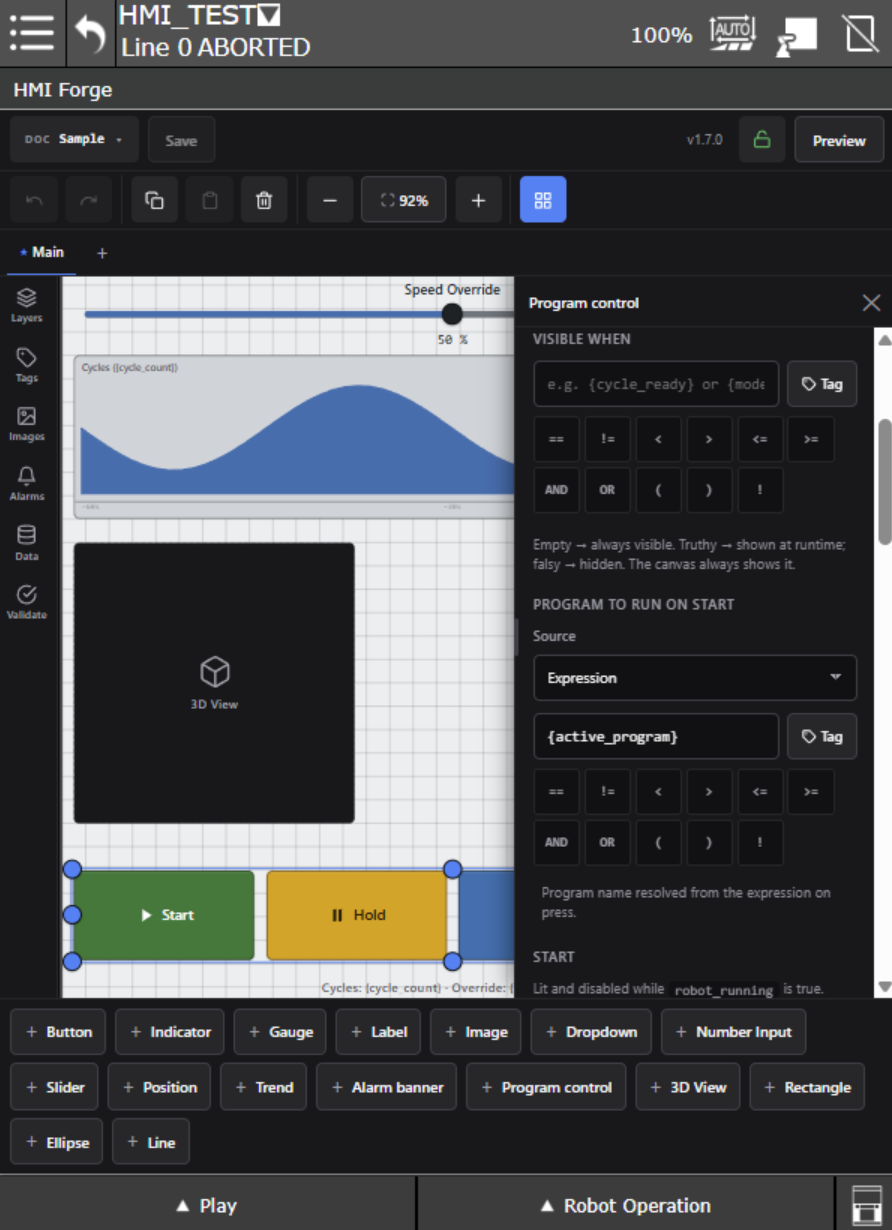
Laying out a screen in the HMI Forge editor
Questions
What people ask on the first call.
If yours isn't here, the docs go deeper than this page does.
How does the robot controller replace the PLC?
In many cells, it already can. The CRX's R-30iB Mini Plus controller has built-in digital I/O for peripheral devices, runs several programs at once with multitasking, and supports background logic that runs continuously alongside them, the way a PLC scans.
What it doesn't have is a custom operator screen. HMI Forge adds that on the Tablet TP. Whether your cell still needs a PLC depends on what else it has to talk to, and the demo call is a good place to work that out.
What software options do I need to order from FANUC?
None. HMI Forge is a plugin developed with FANUC's Plugin SDK. It installs from a single file via FANUC's Plugins menu.
What the robot does need is a Tablet TP. Every CRX ships with one; on a traditional FANUC robot it's
the Tablet TP option, S527. The minimum FANUC software version is
v9.40P/65. You can check your robot via
Menu > Expand All > Status > Version ID.
I run yellow robots too, not just CRX. Same tool?
Yes, as long as the robot has the Tablet TP option, S527. HMI Forge targets the Tablet TP
rather than a robot family, so everything on this page applies unchanged: same editor, same controls,
same tag binding, same USB workflow.
That means one HMI tool across the whole fleet, not one for the CRX and a PC-based HMI for the rest.
Screens move between robots on a USB stick. On a retrofit, adding
S527 is a much smaller line item than adding a panel HMI, an industrial PC and the
licenses to run it.
What stops an operator from editing the screens I built?
Two locks, and the built-in one needs nothing from FANUC: give the editor a password, and operators see only the running screens. The editor behind them isn't reachable.
If the controller has FANUC's Password Protection option, J541, the lock becomes the
controller's own. HMI Forge writes the passlvl.xml file for you. Once it's imported,
operators can use every screen but can't open the editor at all. Higher user levels keep their
access.
Setting up Password Protection is documented step by step.
Can the robot program ask the operator something and wait for the answer?
Yes. A prompt is a small screen that opens over whatever the operator is looking at. One
CALL in the TP program raises it and waits, and the answer comes back as a number in a
register, so the program can branch on it.
CALL IPL_ONEROBOTICS_HMI_PROMPT('Cell 1','RobotClear',21)
If you know FANUC's Menu Utility option, R577, prompts cover the same ground. They start
from templates like yes/no and pick-from-a-list, but a prompt is a screen, so you can add any control
to it.
A timeline editor icon writes the call for you. Prompts are documented in full.
One screen won't cover my cell. How far does a document go?
A document is the set of screens for one cell. It holds as many as you need, with tabs and a start screen, in portrait or landscape. Controls copy and paste between screens, so the first layout that works becomes the template for the rest.
My cell is air-gapped. Does any of this need internet?
None of it. Everything runs on the controller.
Who builds it
Websites since 2000.
FANUC robots since 2008.

ONE Robotics Company is one person: me, Jay Strybis. I've been building websites since 2000, started my career at FANUC in 2008, and have consulted on robotics full time since 2012.
The CRX plugin system needs both halves at once, web development and robot programming, which is why I started building CRX plugins for other companies in 2023. HMI Forge is the first of several plugins I have planned.
The ONE Robotics website has been a reference for engineers learning to program FANUC robots since 2013, and it hosts several free, open-source tools for FANUC development. My book, Robot Whispering: The unofficial guide to programming FANUC robots, came out in 2018 and has been read by engineers at more than 600 companies.
The demo
Tell me about your cell. Watch its screens take shape.
A demo starts with your cell, not mine. You describe what it does, and together we sketch out what your operator needs to see and touch — the layer the palletizer is on, gripper open or closed, a part-present lamp, a speed override with limits.
Then we build the screen.
The call takes about half an hour. Even if HMI Forge isn't right for the cell, you'll know exactly what the Tablet TP can do.
Try it free on your own robot for two weeks.
Build the real thing before you decide anything. If it doesn't fit, the trial simply expires — nothing keeps running, and nothing to cancel.
What's included
More than a license file.
A call to work out what your operators need
We scope the screen together before you buy anything.
Direct email to the person who wrote it
Not a ticket queue. Feature requests from customers have shipped in days.
Updates included
Bug fixes and new features at no extra cost. No maintenance contract, no renewal.
A free key if the controller is replaced
Mainboard swap, failure, decommission — send the serial and you get a new key at no charge.
Your house style, built once
Four themes come built in, one matching FANUC's own Tablet TP colors. Export yours over USB and it travels to every future cell.
Pricing
$950
First robot
Everything you need to build and run screens.
$650
Each additional robot
Whenever you add them — your rate is locked when you buy.
The terms
- One time, per controller, perpetual
- Works offline — nothing phones home
- No renewal or runtime fees. The screens you build keep running for the life of the robot.
- No panel, no PC, no extra wiring. The screens run on the Tablet TP the robot already has.
Fleets, training centers and demo cells work differently — get in touch.
The guarantee
If your first operator screen isn't running within a week, I'll build it for you.
Get the FANUC notes.
Occasional notes from me on programming FANUC robots, CRX plugin development, and what I see in the field with HMI Forge. No schedule, no filler, unsubscribe in one click.
Robot programming notes, not product announcements.