Indicator
Show the state of a signal at a glance.
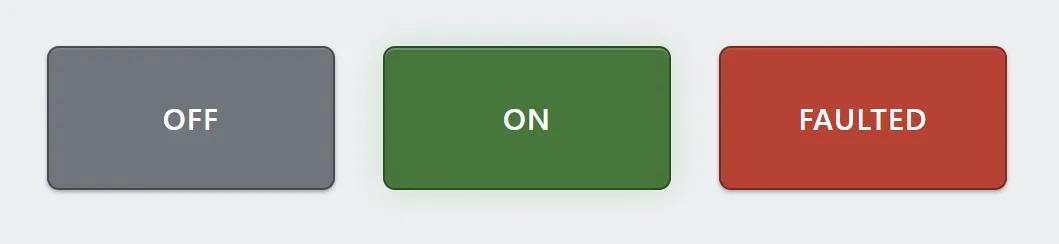
One indicator in three states. Each state carries its own label as well as its own color, so the word changes with the fill.
An indicator is read-only: it shows a state and cannot be pressed. It carries a default appearance plus any number of states, each with a condition. The first state whose condition is true wins, so their order is the priority order.
A state is a complete look — fill, text color, label and optional icon — not
just a color. A fault state can say JAM in red with a warning glyph
while the default says RUNNING.
Adding the control
Section titled “Adding the control”- Open the document and select the screen you want from the screen tabs.
- In the control palette, press Indicator and drag it onto the canvas.
- Set the default appearance, then add a state for each condition worth showing.
Properties
Section titled “Properties”| Property | Description | Default |
|---|---|---|
| Default | The appearance when no state matches: label, variant or fill, and text color. Enter in a label starts a new line. | neutral, OFF |
| States | Conditions, in priority order, each with its own label, color and icon. | none |
| Size | Label size in pixels. | 15 |
| Bold | Semibold label; off is regular weight. | on |
| Align | Horizontal label alignment. | center |
| Flash rate | How fast a flashing state pulses: slow or fast. | slow |
How states resolve
Section titled “How states resolve”States are evaluated top to bottom, and the first true one is shown. Nothing matches — or the control has no states at all — and the default appearance is used.
An indicator with no states at all is warned about in validation, unless its
default label shows a tag value such as {z_offset:3}. That is a value
display, and it needs no states.
A state with an empty condition never matches, and the editor warns about it in validation. There is no need for a catch-all state: the default appearance is the fallback. A state whose expression does not compile is skipped rather than shown, and the editor reports it in validation.
Order is priority: an indicator whose RUNNING state sits above its FAULTED
state keeps showing RUNNING during a fault.
Flashing
Section titled “Flashing”Any state can pulse its color to pull an operator’s eye. The fill never changes while it flashes — it blooms — so a flashing indicator never momentarily reads as the opposite state. Both rates sit well under the threshold for seizure-inducing flicker, and reduced-motion settings hold a steady bloom rather than dropping the signal.
Related
Section titled “Related”- Expressions — the syntax used by state conditions.
- Tags — naming the signals a condition reads.
- Alarm banner — for conditions that need acknowledging rather than just showing.