Number input
Enter a numeric value with a touch keypad.
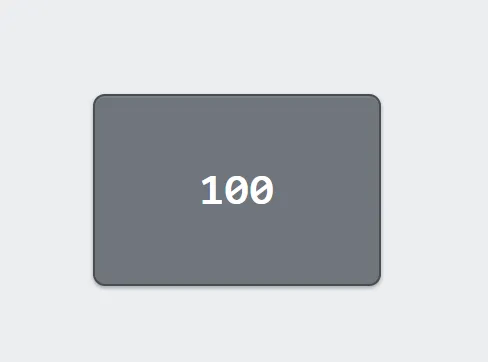
A number input shows the current value of a numeric tag and lets an operator type a new one. Tapping it opens a keypad sized for gloves rather than relying on the pendant’s own keyboard.
For a value adjusted within a fixed range rather than typed, see Slider.
Adding the control
Section titled “Adding the control”- Open the document and select the screen you want from the screen tabs.
- In the control palette, press Number and drag it onto the canvas.
- Bind it to a tag and set the limits the value must stay within.
Properties
Section titled “Properties”| Property | Description | Default |
|---|---|---|
| Label | Text shown above the control. | none |
| Tag | The value read and written. | none |
| Unit | Suffix shown after the number. | none |
| Min / Max | Limits enforced on entry. Leave empty for none. | none |
| Decimals | Digits after the decimal point. | 0 |
| Size | Value size in pixels. | 22 |
| Fill / Text color | Appearance. | theme tokens |
| Disabled expression | Expression that, when true, grays the control out and stops it opening. | never |
Entering a value
Section titled “Entering a value”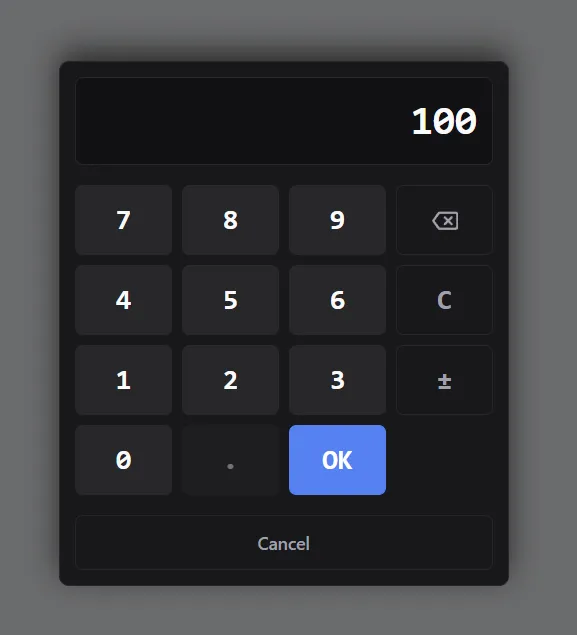
The keypad that opens when the control is tapped.
The value being typed is shown at the top. C clears it, the arrow deletes the last digit, and ± flips the sign. OK writes the result to the tag; Cancel leaves the tag unchanged.
Keys that cannot apply are disabled rather than hidden: ± when Min is zero or above, the decimal point when Decimals is zero, and OK while the entered value is outside Min–Max.
Limits
Section titled “Limits”Min and Max show as labeled values under the entry readout. While the entered value is outside them, the violated limit turns red and OK is disabled — the operator corrects the entry rather than having it silently changed to the nearest limit. A value outside the range never reaches the controller. Both limits are optional.
Decimals control display and rounding.
Disabling entry
Section titled “Disabling entry”Disabled expression takes the same syntax buttons use. While it is true the control grays out and the keypad will not open, so a setpoint can be locked while a program runs, or while the cell is in a state where changing it would mean nothing.